

Advanced ViewModel Patterns: One-Time Events, SavedState, and Retry Logic in Compose
“My navigation event triggers again after rotation.”
“The last toast was shown twice when the user reopened the page.”
“My app loses state during a config change.”
If you’ve gone through these in Jetpack Compose (and who has not?), then these are the limitations of the fundamental ViewModel usage.
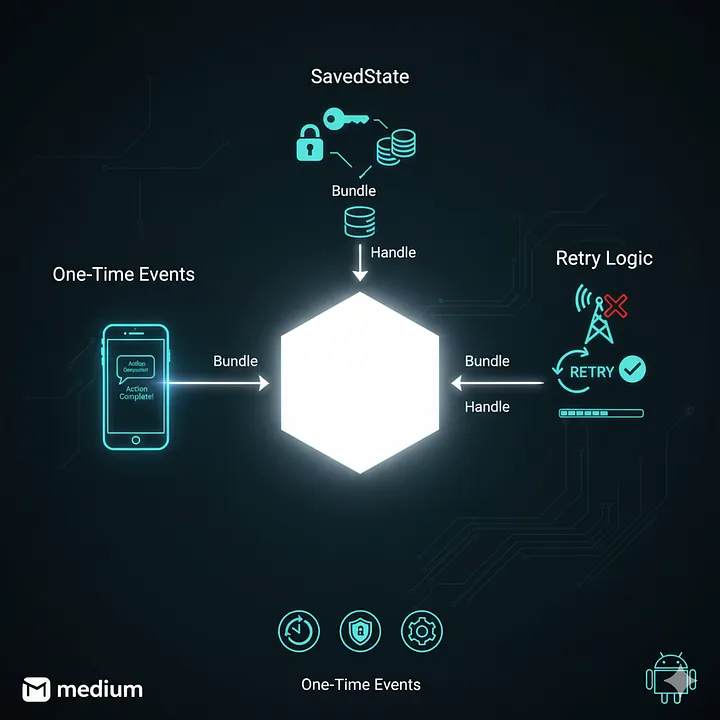
This article explores the advanced ViewModel patterns every experienced Android developer should know:
– One-time events (navigation, snackbars, etc.)
– Saved state restoration
– Retry with exponential backoff
– ViewModel testing best practices
Let’s break them down with code.
1. Understanding the “One-Time Event” Problem
In Compose, UI state is replayed after configuration changes or process recreation.
That’s perfect for persistent data like a loading state or form input,
but terrible for transient events — like navigation or a Snackbar message.
Imagine this:
val state by viewModel.state.collectAsState()
if (state.error != null) {
    Toast.makeText(context, state.error, Toast.LENGTH_SHORT).show()
}
Oops. That Toast will trigger again after every recomposition — even rotations.
We need event channels that:
- Emit once
- Are lifecycle-safe
- Works nicely with Compose
2. Channels vs SharedFlow: Which to Use?
There are two main ways to handle one-time events:
| Pattern | Type | Best For | Behavior |
|---|---|---|---|
| Channel | Cold stream | Simple one-shot events | Each collector gets event once |
| SharedFlow | Hot stream | Multi collectors | Replays configurable number of emissions |
For most Compose screens, Channel is ideal: simple, one-off, and guaranteed delivery.
If you need multiple collectors (e.g., UI + logger), go with SharedFlow.
3. Implementing One-Time Events in ViewModel
Let’s create a NavViewModel that sends navigation commands once.
class NavViewModel : ViewModel() {

    private val _navChannel = Channel<String>(Channel.BUFFERED)
    val navigation = _navChannel.receiveAsFlow()

    fun onLoginSuccess() {
        viewModelScope.launch {
            _navChannel.send("home")
        }
    }
}
Then in your Composable:
@Composable
fun LoginScreen(vm: NavViewModel = viewModel(), onNavigate: (String) -> Unit) {
    val context = LocalContext.current

    LaunchedEffect(Unit) {
        vm.navigation.collect { route ->
            onNavigate(route)
        }
    }

    Button(onClick = { vm.onLoginSuccess() }) {
        Text("Login")
    }
}- Event sent once.
- Survives recomposition.
- Automatically collected only once by Compose.
4. SavedStateHandle — Surviving Process Death
Configuration changes are one thing.
But process death is another beast.
If your app is backgrounded and killed, your ViewModel dies too.
You can survive this using SavedStateHandle — part of the AndroidX lifecycle suite.
Example: Restoring a Post Detail ViewModel
@HiltViewModel
class PostDetailViewModel @Inject constructor(
    private val repo: PostRepository,
    private val savedStateHandle: SavedStateHandle
) : ViewModel() {

    val postId: String = savedStateHandle["postId"] ?: ""

    private val _uiState = MutableStateFlow(PostDetailUi())
    val uiState = _uiState.asStateFlow()

    init {
        loadPost()
    }

    fun loadPost() = viewModelScope.launch {
        _uiState.update { it.copy(loading = true) }
        val post = repo.getPost(postId)
        _uiState.update { it.copy(loading = false, post = post) }
    }
}
Passing arguments through navigation:
navController.navigate("postDetail/${post.id}")And in your NavGraph:
composable("postDetail/{postId}") { backStack ->
    val postId = backStack.arguments?.getString("postId") ?: ""
    val vm: PostDetailViewModel = hiltViewModel()
    PostDetailScreen(vm)
}- The post ID is automatically restored even after process death.
- No manual persistence or SharedPreferences needed.
5. Retry Logic — Done Elegantly
Every network call fails sometimes.
Instead of spamming users with “Retry” buttons or writing ugly loops,
You can use structured concurrency + exponential backoff.
Here’s a neat extension function:
suspend fun <T> retryWithBackoff(
    retries: Int = 3,
    initialDelay: Long = 300,
    factor: Double = 2.0,
    block: suspend () -> T
): T {
    var currentDelay = initialDelay
    repeat(retries - 1) {
        runCatching { return block() }
        delay(currentDelay)
        currentDelay = (currentDelay * factor).toLong()
    }
    return block()
}
Use it in your ViewModel:
class WeatherViewModel(private val repo: WeatherRepo) : ViewModel() {
    private val _ui = MutableStateFlow(WeatherUi())
    val ui = _ui.asStateFlow()

    fun refreshWeather() = viewModelScope.launch {
        _ui.update { it.copy(loading = true) }
        runCatching {
            retryWithBackoff {
                repo.getWeather()
            }
        }.onSuccess {
            _ui.update { it.copy(loading = false, data = it) }
        }.onFailure { e ->
            _ui.update { it.copy(loading = false, error = e.message) }
        }
    }
}- Simple.
- Configurable.
- Works with coroutines and test dispatchers.
6. Testing ViewModels the Right Way
A good ViewModel test checks:
- State transitions
- One-time events
- Retry logic (using fake repos or mock delays)
Here’s an example:
@OptIn(ExperimentalCoroutinesApi::class)
class WeatherViewModelTest {

    private val fakeRepo = object : WeatherRepo {
        var calls = 0
        override suspend fun getWeather(): String {
            calls++
            if (calls < 3) error("Network down")
            return "Sunny"
        }
    }

    @Test
    fun `retries twice then succeeds`() = runTest {
        val vm = WeatherViewModel(fakeRepo)
        vm.refreshWeather()
        advanceUntilIdle()
        assertEquals("Sunny", vm.ui.value.data)
        assertEquals(3, fakeRepo.calls)
    }
}- No Android dependencies.
- Deterministic behavior via
advanceUntilIdle(). - Fully testable retry logic.
7. Compose Integration Tips
| Task | Best Practice |
|---|---|
| Navigation | Emit routes via Channel, collect in `LaunchedEffect` |
| Snackbars/Toasts | Use SharedFlow or Channel |
| Saved state | `SavedStateHandle` for simple args, DataStore for persistent data |
| Long-running jobs | Use `viewModelScope.launch(Dispatchers.IO)` |
| Testing | Use `runTest` + fake repos |
Compose simplifies state management — but you need discipline to separate state, events, and effects properly.
Real-World Example: Login with Retry + Events + SavedState
Let’s combine everything we learned.
@HiltViewModel
class LoginViewModel @Inject constructor(
    private val repo: AuthRepository,
    private val saved: SavedStateHandle
) : ViewModel() {

    private val _ui = MutableStateFlow(LoginUi())
    val ui = _ui.asStateFlow()

    private val _events = Channel<LoginEvent>(Channel.BUFFERED)
    val events = _events.receiveAsFlow()

    fun login(email: String, pass: String) = viewModelScope.launch {
        _ui.update { it.copy(loading = true) }

        runCatching {
            retryWithBackoff { repo.login(email, pass) }
        }.onSuccess {
            _ui.update { it.copy(loading = false) }
            _events.send(LoginEvent.NavigateHome)
        }.onFailure {
            _ui.update { it.copy(loading = false, error = it.message) }
            _events.send(LoginEvent.ShowToast("Login failed"))
        }
    }
}

data class LoginUi(val loading: Boolean = false, val error: String? = null)
sealed interface LoginEvent {
    data object NavigateHome : LoginEvent
    data class ShowToast(val msg: String) : LoginEvent
}
And in Compose:
@Composable
fun LoginScreen(vm: LoginViewModel = hiltViewModel(), onNavigateHome: () -> Unit) {
    val state by vm.ui.collectAsStateWithLifecycle()
    val ctx = LocalContext.current

    LaunchedEffect(Unit) {
        vm.events.collect { event ->
            when (event) {
                is LoginEvent.ShowToast -> Toast.makeText(ctx, event.msg, Toast.LENGTH_SHORT).show()
                LoginEvent.NavigateHome -> onNavigateHome()
            }
        }
    }

    // Compose UI…
}- Retry logic handled cleanly.
- State restored automatically.
- Navigation + toasts are emitted once only.
8. Why These Patterns Matter
As your app grows:
- One-time events prevent duplicated triggers.
- SavedStateHandle ensures resilient user flows.
- Retry strategies avoid user frustration.
- Testing makes refactoring safe.
These are the patterns senior engineers rely on to keep codebases sane — and what Google looks for in GDEs and speaker-level engineers.
Wrapping Up
ViewModels are powerful — but only if you use them beyond the basics.
With Channels, SavedStateHandle, and retry backoff, your Compose architecture becomes production-grade:
- Predictable events
- Resilient state
- Testable concurrency
Compose makes it beautiful. You make it bulletproof.
TL;DR
- Use
ChannelorSharedFlowfor one-time events. - Persist lightweight UI data with
SavedStateHandle. - Use
retryWithBackoff()for reliable network resilience. - Test everything with
runTest, and fake repositories.
Author’s Note
If this article helped you level up your Android craft, follow me for the next chapter in “Mastering Modern Android Development.”
Your code deserves clarity, not chaos. Let’s build it right.